
ADVERTISEMENT
ADVERTISEMENT
In today's digital age, the need for accessible, reliable, and secure cloud storage has never been more essential. Among the various options available, the Microsoft OneDrive app stands out as a robust solution for users seeking to store, share, and collaborate on files seamlessly. This review will explore the app's features, user feedback, recent updates, device requirements, and permission necessities, providing you a comprehensive understanding of what the Microsoft OneDrive app has to offer.
The Microsoft OneDrive app is designed to be user-friendly while providing extensive features that enhance the overall user experience. Below are some of the standout features that make it a compelling choice:
1. Free and Premium Storage Options: Beginning with 5 GB of free storage, the Microsoft OneDrive app allows users to sync and access their files across devices, while the option to upgrade to a Microsoft 365 Personal or Family plan grants each user a whopping 1 TB of storage for optimal usage.
2. Back Up Photos & Videos: Users can turn on the Camera Upload feature for automatic backup of photos and videos. The secure photo locker includes automatic tagging, offering an organized viewing experience and encrypted storage to keep your media safe.
3. File Sharing and Access: Sharing files, albums, and videos with friends and family is straightforward with Microsoft OneDrive. The app allows for offline access to selected files, offers notifications for document edits, and features secure folder settings to create password-protected or expiring sharing links.
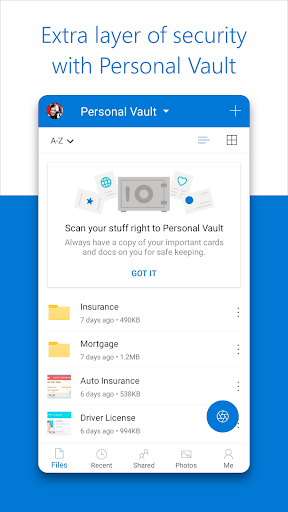
4. Security Features: Microsoft OneDrive ensures your files are encrypted both at rest and in transit. The Personal Vault adds an extra layer of identity-verified protection while the version history feature allows users to restore previous file versions swiftly. Additionally, built-in ransomware detection and recovery features help protect against malicious threats.
5. Collaboration with Microsoft: Integration with Microsoft Office apps such as Word, Excel, PowerPoint, and OneNote provides a streamlined experience for editing and real-time collaboration on documents stored in OneDrive. This feature is invaluable for both personal and professional users.
6. Document Scanning: Users can scan, sign, markup, and send documents directly from the OneDrive mobile app, keeping all documents safe in a designated secure folder.
7. Search Functionality: The search capabilities within Microsoft OneDrive are impressive, enabling users to search photos by content (e.g., "beach," "snow") or documents by name or content for quick retrieval.
8. AI Assistance with Copilot: A standout feature for 365 subscribers, the AI assistant can summarize documents, extract key details, organize files, and provide intelligent recommendations for sharing and collaboration, all enhancing productivity.
The reception of the Microsoft OneDrive app among users has been largely positive. Here are some snippets of user reviews reflecting their experiences:
1. Positive Feedback: Many users appreciate the app's clean interface and straightforward functionality. A common sentiment is that the "free Microsoft OneDrive app" is reliable for personal storage needs, making it easy to "download Microsoft OneDrive" on their devices without hassle.
2. Collaboration Praise: Users in team settings frequently mention the app’s collaboration features as a highlight, noting how easy it is to work on documents together in real-time.
3. Security Assurance: The security features, especially the Personal Vault, have received commendations for giving users peace of mind about their data. One user said, “It feels great knowing my files are secure and encrypted.”
4. Concerns and Critiques: Some users have voiced concerns about occasional connectivity issues, particularly when accessing files offline. A few have noted that they would like to see improved syncing speeds for large files.
5. Room for Improvement: Some users suggest enhancements for the AI Copilot features, indicating they would like more advanced capabilities to further streamline their workflows.
Overall, the balance of positive reviews against a few critiques indicates that while the app is generally well-received, there remain avenues for improved user experience.
The Microsoft OneDrive app is consistently updated, with the latest updates reflecting user feedback and evolving technology trends. Here are a few of the significant recent functions added to the app:
1. Enhanced Document Scanning: Recent updates have improved the clarity of scanned documents, enabling users to capture higher-quality scans right from their mobile devices.
2. AI Features Expansion: Ongoing enhancements to the AI Copilot have made it easier to summarize large documents, offering users fast insights into their content.
3. New Sharing Options: Microsoft has introduced the ability to create more customized sharing links, allowing users to set specific permissions for recipients, enhancing security and control over shared files.
4. Improved Offline Functionality: Updates have also focused on optimizing access to selected files offline, allowing for smoother operation even when not connected to the internet.
5. Interface Improvements: Regular interface tweaks ensure a smooth user experience, with improved navigation and better categorization of files and media, making it simpler to manage digital assets.
These updates exemplify Microsoft's commitment to providing users with a modern, efficient cloud storage solution and highlight its responsiveness to user needs.
Before diving into the Microsoft OneDrive installation, users should be aware of the device requirements:
1. Compatibility: The Microsoft OneDrive app is available on both Android and iOS platforms, ensuring a broad audience can access its features.
2. Operating System: For Android users, the app requires OS version 6.0 or later, while iOS users need to have version 12.0 or higher for optimal functionality.
3. Storage Space: Users should ensure there is adequate storage space on their devices during installation to prevent performance issues when syncing files.
4. Internet Connection: A stable internet connection is highly recommended for initial setup and when syncing large files for seamless access.
By meeting these simple requirements, users can enjoy the benefits of cloud storage and file management offered by the Microsoft OneDrive app.
To fully leverage the functionalities of the Microsoft OneDrive app, users need to grant specific permissions:
1. Storage Permission: The app requires access to your device's storage to upload and download files, ensuring seamless integration of your digital assets.
2. Camera Access: For users wishing to utilize the Camera Upload feature, permission to access the camera is necessary.
3. Location Access: To make use of certain tagging features, permission to access location services may also be required, allowing for better organization of photos.
4. Network Access: Overall connectivity permissions are needed to establish a reliable connection for file sharing, syncing, and receiving updates.
Understanding these permissions helps users navigate the setup process more efficiently and enjoy an uninterrupted experience with the Microsoft OneDrive app.
In conclusion, the Microsoft OneDrive app emerges as a powerful yet user-friendly cloud storage solution. With a comprehensive set of features ranging from ample free storage to advanced AI capabilities, it caters to both casual users and professionals alike. By consistently addressing user feedback and integrating new technologies, Microsoft positions OneDrive as an invaluable tool for managing your digital life, making it well-worth the effort to download and install Microsoft OneDrive on any compatible device. Whether you’re looking to back up files, collaborate with colleagues, or keep your media secure, the Microsoft OneDrive app is designed to meet your needs.




Welcome to AppSparkle - your independent guide to discovering trending and popular apps. Our mission is to provide a user-friendly platform highlighting popular apps available on official stores.
At AppSparkle, we gather and present app information to help you explore options across Google Play and the Apple Store. Our descriptions are based on public sources and aim for accuracy, but we encourage verifying details directly on official store pages.
Important Notice:
AppSparkle is an independent third-party platform. We are not affiliated with, endorsed by, or officially connected to any app developers, brands, Google Play, Apple App Store, or their parent companies. All app names, logos, and trademarks belong to their respective owners.
We strive to make app discovery straightforward. Links provided will direct you to secure download pages on Google Play or the Apple App Store.


