
ADVERTISEMENT
ADVERTISEMENT
The digital landscape continues to evolve, and with it, the seamless integration of devices has become more paramount than ever. One such integration is embodied in the Link to Windows app, a tool designed to bridge the gap between Android smartphones and Windows PCs. If you're looking to enhance your digital workflow or simply want everything you love on your phone accessible from your PC, this review covers essential features, user experiences, updates, device requirements, and permission requirements for the Link to Windows app.
1. Text Messages and Calls Management
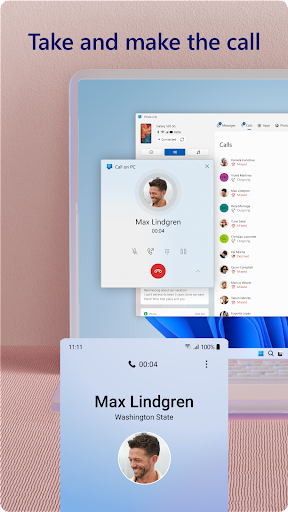
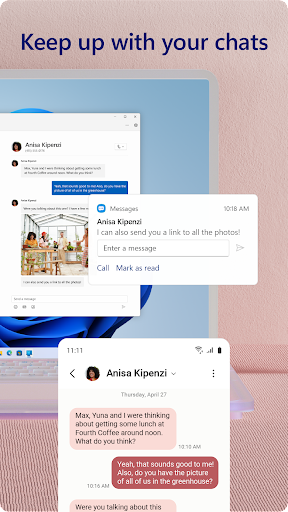
One of the standout functionalities of the Link to Windows app is the ability to manage text messages and calls directly from your PC. Users can view and respond to messages as they come in, eliminating the need to switch between devices constantly. For those who juggle multiple tasks, this feature is invaluable. Additionally, the ability to make and receive calls directly from the PC simplifies communication, making it underlined with specific user convenience.
2. Notification Center
With the Link to Windows apk, you gain the power to view all your Android phone's notifications right on your PC. Instead of missing important updates because your phone is out of reach, the app consolidates your notifications in one place. This seamless transition in managing alerts allows users to stay organized and focused on their work without constant distractions.
3. File Sharing Made Easy
Gone are the days when emailing yourself photos or documents was necessary. The Link to Windows app facilitates smooth file transfer—users can easily drag and drop files between devices. This feature supports a more efficient workflow, especially for creatives or professionals who frequently share images or documents.
4. Cross-Device Copy and Paste
The app boasts a unique cross-device copy and paste feature, which allows users to copy content from their Android phone and paste it directly on their PC, and vice versa. This function streamlines tasks such as drafting emails or compiling notes, enhancing productivity across devices.
5. Use Your PC’s Interface
The Link to Windows installation provides an opportunity to experience your phone's functionality on a larger screen. Users can leverage their PC’s keyboard, mouse, and touch interface to interact with mobile apps, enhancing usability and making productivity tasks easier.
In essence, these features encapsulate why the Link to Windows app is groundbreaking. It provides a unique ecosystem wherein users can optimize their daily tasks without the constant toggle between devices.
Feedback from users illustrates the app's effectiveness and its impact on daily routines:
1. Efficiency and Functionality:
Many users praise the Link to Windows download for its capability to streamline their workflow. One user noted, “Being able to respond to texts and manage notifications from my PC has changed the way I work; I no longer miss important messages.”
2. User-Friendly Interface:
The intuitive design of the app has received accolades. A user remarked, “The interface is clean and easy to navigate, making Link to Windows a top choice for those looking to enhance productivity.”
3. Device Compatibility:
While the app is loaded with features, some users have pointed out compatibility issues. "I wish it supported more devices, but those with the right Android specifications will find this app invaluable,” noted another user.
4. Audio Calls:
Welcoming feedback, one user shared, “Making and receiving calls from my PC is a game changer, especially during work hours."
5. Room for Improvement:
Conversely, a few users showed interest in additional functionalities, such as more robust app support. “I hope Microsoft continues to build on this platform for even more features in future updates,” expressed one reviewer.
Overall, the reviews indicate that while there are minor quibbles, the Link to Windows app significantly enhances the user experience when bridging Android and Windows devices.
Staying relevant in a fast-changing digital environment means consistent updates are crucial, and Microsoft understands this well. The Link to Windows app has seen a range of updates that improve functionality and user experience:
1. Enhanced Copy and Paste Features:
Recent updates have refined the cross-device copy and paste capabilities, ensuring that users experience less friction when transferring data between devices.
2. Expanded App Compatibility:
Microsoft has continually expanded the list of compatible apps with devices like the Microsoft Duo, Samsung, and HONOR smartphones, ensuring a more inclusive experience.
3. Improved Notification Handling:
Enhancements have been made to notification syncing, ensuring minimal lag time between receiving notifications on the phone and their appearance on the PC.
4. Feature Requests:
The app welcomes user feedback, enabling continuous improvement based on what users want the most. This bi-directional communication cements the app's relevance and user commitment.
5. UI Tweaks:
Regular updates have also focused on minor interface tweaks to improve overall usability and aesthetic appeal, ensuring the tool not only works well but looks good while doing it.
For those exploring the free Link to Windows app, rest assured that regular updates are designed to enhance the experience and incorporate user requests actively.
Getting started with the Link to Windows app requires specific technical specifications to ensure smooth functionality. Here’s what you need:
1. PC Specifications:
To enjoy the full feature set, you’ll need a Windows 10 PC, specifically one with Bluetooth capability for call functions. The May 2020 Update or later and at least 8GB of RAM is ideal for optimal performance.
2. Android Compatibility:
While the app supports a broad range of devices, it is essential to have an Android device running Android 11.0 or later for full functionality. Not all manufacturers are supported, so a check on the compatibility list is advisable.
3. Network Requirements:
A stable internet connection is necessary for effective communication between devices, ensuring that notifications, texts, and calls are synced in real time.
4. Account Requirements:
Users will need to have their Microsoft accounts ready for login Link to Windows, which can streamline the integration of services.
Being cognizant of these requirements is crucial for users interested in installing the Link to Windows apk and ensures a seamless transfer and usage experience.
Privacy considerations have become increasingly essential for users in today's digital world. The Link to Windows app operates under specific permission requirements:
1. Access to Photos:
Users must grant the app permission to access photos and files on their Android device to facilitate easy sharing via drag-and-drop features.
2. Notification Access:
Enabling notification access allows the app to pull notifications from the Android device to the Windows PC efficiently.
3. Calls Permissions:
For the calling feature to work, the app requires permissions to access the phone and contacts. It’s vital for communicating effectively across devices.
4. Screen Recording (Optional):
Certain features, like Phone Screen and Apps, require optional screen recording permissions for complete functionality.
5. Accessibility Service:
For users utilizing screen-reading tools, it's necessary to enable the Accessibility Service to manage and control the phone’s apps effectively from the PC.
In conclusion, the Link to Windows app represents a significant leap forward in device connectivity, combining essential features that foster productivity. Its user-friendly interface, compatibility with numerous Android devices, and consistent updates make it a compelling choice for anyone looking to integrate their mobile devices with a Windows PC. With minimal installation requirements and robust functionalities, the Link to Windows represents a must-have app in today's interconnected world. Whether you are a casual user or a professional, this bridge between your mobile and computer makes tasks more manageable and enjoyable. Explore the free Link to Windows app today, and experience the convenience of a unified digital workspace.




Welcome to AppSparkle - your independent guide to discovering trending and popular apps. Our mission is to provide a user-friendly platform highlighting popular apps available on official stores.
At AppSparkle, we gather and present app information to help you explore options across Google Play and the Apple Store. Our descriptions are based on public sources and aim for accuracy, but we encourage verifying details directly on official store pages.
Important Notice:
AppSparkle is an independent third-party platform. We are not affiliated with, endorsed by, or officially connected to any app developers, brands, Google Play, Apple App Store, or their parent companies. All app names, logos, and trademarks belong to their respective owners.
We strive to make app discovery straightforward. Links provided will direct you to secure download pages on Google Play or the Apple App Store.


