
ADVERTISEMENT
ADVERTISEMENT
In the modern financial landscape, mobile banking is no longer a luxury; it is a necessity. The Wells Fargo Mobile app stands as a testament to this trend, providing a myriad of features designed to enhance account management, streamline transactions, and bolster security for its users. Below, I will explore various aspects of the Wells Fargo Mobile app, from its key features to user reviews, device requirements, and permission requirements, culminating in an all-encompassing review of this widely used application.
The Wells Fargo Mobile app is packed with an array of features that cater to personal finance management. Here are five key functionalities that make it stand out:
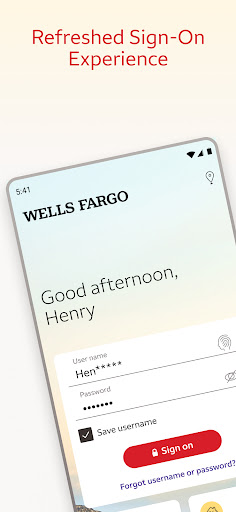
1. Account Management: Users can access a comprehensive view of their cash, credit, and investment accounts via Fingerprint Sign On or Biometric Sign On. This streamlined login process enhances user experience while maintaining security. The ability to review activity and balances is crucial for effective budgeting and financial oversight. The app also simplifies credit card management by allowing users to view transactions, manage rewards, turn cards on or off, and access Card Settings for recurring payments.
2. Deposit Funds: One of the standout functionalities of the Wells Fargo Mobile app is the capability to deposit checks using the Android camera. Users can instantaneously view the processing deposit in their account, making it handy for individuals who may not be able to visit a physical branch regularly. This feature is essential for those seeking convenience and efficiency in managing their finances.
3. Make Transfers and Payments: Through the Wells Fargo app, users can effortlessly transfer funds between their Wells Fargo accounts and to other financial institutions. This flexibility is invaluable for those juggling multiple financial commitments. In addition, with Zelle®, sending and receiving money to friends and family is as simple as using their mobile phone number or email address, which broadens the app's appeal. Users can also conveniently pay their bills through the app, adding an additional layer of ease in managing expenses.
4. Track Investments: The app also serves as a robust platform for monitoring investments. Users with WellsTrade® accounts can keep an eye on balances, holdings, account activity, and open orders. Real-time quotes, charts, and market data are easily accessible, making the app beneficial for those invested in markets and seeking to make informed decisions.
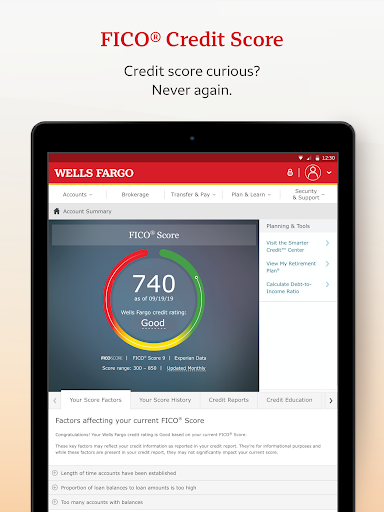
5. Stay Secure: Security is paramount in mobile banking, and the Wells Fargo Mobile app takes this seriously. The app features a Security Center that enables users to report fraud and manage alerts, including notifications for suspicious card activity. Furthermore, users have access to their FICO® Credit Score, allowing them to stay informed about their credit health.
These features collectively create a powerful tool for managing personal finances, making the Wells Fargo Mobile app an essential companion for both Android and iOS users. The availability of the free Wells Fargo Mobile app offers an opportunity for a wide audience to benefit from its functionalities.
User feedback is critical in assessing the effectiveness of any application. Based on reviews from both Android and iOS users, the Wells Fargo Mobile app has garnered a mix of praise and constructive criticism.
Many users have lauded the app for its user-friendly interface and its efficiency in handling transactions. Comments such as "The Wells Fargo Mobile apk is quick and reliable" and "I can easily track my spending with this app" highlight the appreciation for its streamlined functionality. Furthermore, users find the card activation feature particularly valuable, stating that it provides peace of mind in case of lost or stolen cards.
Conversely, some reviews mention areas for improvement. Issues related to occasional bugs during app updates and frustrations around the mobile check deposit feature have been noted. For instance, some users have found that not all checks are eligible for mobile deposit, causing inconvenience. Overall, the ratings for the Wells Fargo Mobile app reflect a general satisfaction, but they also indicate a desire for ongoing enhancements.
Staying current with app functionality is essential for any successful financial tool. Recent updates to the Wells Fargo Mobile app have introduced several exciting features and improvements. For example, enhancements to the user interface have made it even easier to navigate the app, allowing for seamless transitions between account management, transfers, and investment tracking.
Additionally, recent updates have improved the Zelle® integration, ensuring quicker transfers and better visibility for transactions. These updates demonstrate Wells Fargo's commitment to staying ahead in the competitive mobile banking space and enhancing user experience continuously. The Wells Fargo Mobile download has also been simplified, making the installation process an almost instantaneous experience for new users looking to integrate this practical app into their financial lives.
Before downloading the Wells Fargo Mobile app, it is important for users to be aware of the device requirements. The app is designed for both Android and iOS platforms, ensuring a wide reach. However, it is essential to note that certain features, such as Fingerprint Sign On and Biometric Sign On, are only available on specific devices. Therefore, potential users should verify compatibility with their smartphones before pursuing the Wells Fargo Mobile installation.
Moreover, users should also check if their device is suitable for features like mobile check deposit and Zelle®. Not all smartphone models may offer the same capabilities, which can impact the overall experience when using the app.
To use the Wells Fargo app to its fullest potential, users should be prepared to grant several permissions. These may include access to the device's camera for check deposits, notifications for alerts related to suspicious activities, and the ability to send and receive money through Zelle®. While some users may have concerns about privacy, granting these permissions is essential for unlocking the app's full features, thereby providing a comprehensive solution for financial management.
The Wells Fargo Mobile app emphasizes security in its permission requirements, ensuring that users can manage alerts and notifications effectively. Users should review these permissions carefully during the login process to make informed decisions.
In conclusion, the Wells Fargo Mobile app emerges as a comprehensive mobile banking solution that offers users a variety of features tailored to enhance their personal finance management experience. The combination of innovative functionalities such as mobile deposits, fund transfers, investment tracking, and security measures makes this app a must-have for anyone looking to streamline their banking experiences. With continuous updates and a generally positive reception from users, downloading the Wells Fargo Mobile app is an intelligent choice for both Android and iOS users looking to elevate their banking experience.





Welcome to AppSparkle - your independent guide to discovering trending and popular apps. Our mission is to provide a user-friendly platform highlighting popular apps available on official stores.
At AppSparkle, we gather and present app information to help you explore options across Google Play and the Apple Store. Our descriptions are based on public sources and aim for accuracy, but we encourage verifying details directly on official store pages.
Important Notice:
AppSparkle is an independent third-party platform. We are not affiliated with, endorsed by, or officially connected to any app developers, brands, Google Play, Apple App Store, or their parent companies. All app names, logos, and trademarks belong to their respective owners.
We strive to make app discovery straightforward. Links provided will direct you to secure download pages on Google Play or the Apple App Store.


