
ADVERTISEMENT
ADVERTISEMENT
Calendar App is built for instant event management, so after every call it surfaces your latest calendar entries with call details for fast follow-ups.
You can schedule tasks, meetings, and plans with a simple daily calendar and planner flow, without juggling multiple tools.
Daily To Do List helps you create to-dos, then tick off a check list as tasks are completed.
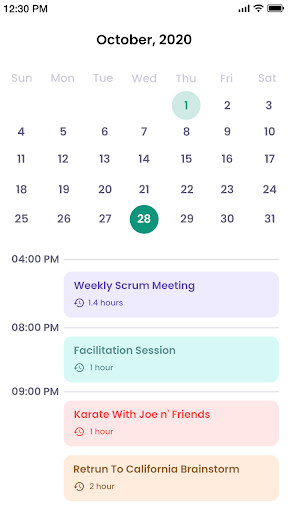
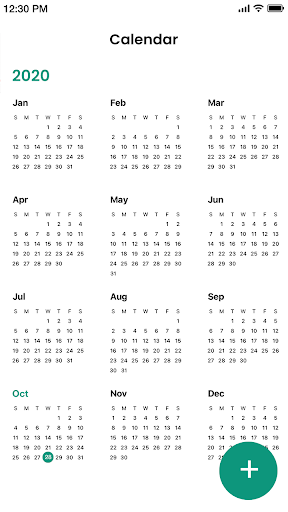
Simple Calendar offers 3-day view, week view, month view, and year view, so planning stays flexible.
Week agenda view keeps your weekly planner clear, making it easy to see what matters at a glance.
Find My location lets you select a spot on a map and add it to your Digital Calendar entry.
Notification reminders are fully under your control, so you decide when each free Calendar app alert fires.
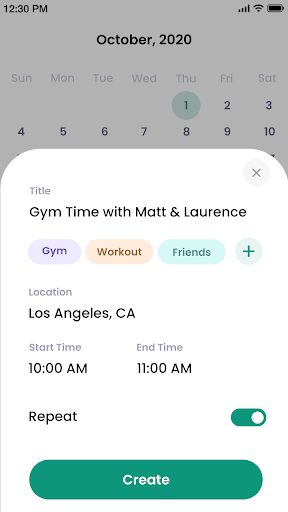
Category hashtag expert supports tags like birthday, anniversary, gym, workout, out of office, or friends, plus custom categories.
Simple notes let you attach helpful context to any event, meeting, or plan.
Team meeting support syncs with Google calendar, helping you organize and schedule with other people through shared coordination.
Appointment reminder covers one-time or recurring reminders, so recurring routines stay on track.
Artful agenda look includes light and dark themes and lets you change calendar color.
MinimaList weekly to-do list provides three weekly layout options for a calmer, readable planner.
Holiday today calendar can add national holidays for selected countries.
Easy call functionality is a standout: it shows recent calendar planner items alongside call information after every call.
Calendar App also supports syncing, creating and editing events, sharing calendar access, inviting people, and setting reminders.
You can customize the calendar experience with themes and widgets, plus back up and restore your data.
The calendar planner adds clarity by switching between different app views and creating task lists, reminders, and weekly schedule planning.
For a new icalendar entry or schedule update, tap your chosen day and add an event with start and finish times, then include location and category.
More options let you set recurrence and add calendar notes, while the main menu helps you access tasks, meetings, reminders, and your weekly agenda.
If you want a free Calendar app workflow, the overall interface stays straightforward from tap to event setup, with plenty of customization.
For anyone searching install Calendar and looking for a smooth organizer, the combination of views, reminders, notes, and sync makes it practical.
If you are planning your Calendar free download path, the experience is designed to keep your day coordinated rather than complicated.
Many users also like how Calendar App Download and install Calendar fit into everyday routines, especially for busy work schedules.
When you want a reliable companion, downloading via Download Calendar APK can feel like a direct upgrade to how you manage time.
Overall, Calendar App Download and Calendar free download options support a clear daily rhythm with weekly planning power.
Users often highlight how Calendar App makes follow-up scheduling effortless after calls, because the app presents the newest calendar entries with call details.
Several reviews mention that the simple 3-day to year view navigation reduces friction when switching between daily tasks and long-term plans.
People also appreciate the Daily To Do List, since ticking off check lists turns planning into a more satisfying routine.
Many ratings praise notification reminders, especially when they can be timed exactly, not guessed.
Reviewers who manage shared schedules describe how sharing and invites help keep a family calendar or work calendar aligned.
Some users like category hashtag expert, saying it makes birthdays, gym sessions, and out-of-office days easier to recognize quickly.
Several comments mention widgets and themes, noting that the calendar widget and home screen controls keep schedules visible.
When users discuss Calendar App Download, they frequently bring up how quickly they could install Calendar and start creating events.
A number of reviewers recommend trying Calendar free download for those who want a free Calendar app style setup without heavy configuration.
There are also mentions that Download Calendar APK feels straightforward, and the core calendar planner is usable right away.
One recurring compliment is the weekly agenda clarity, which helps people see their week without opening multiple screens.
Users who plan travel or meetings like the location map entry, because it keeps details attached to the right event.
Overall feedback suggests Calendar App Download works well for personal, family, and work planning, with consistent organization tools.
Recent updates focus on smoother event handling, especially around instant event management after calls.
Improved call-to-calendar integration makes it easier to schedule follow-up tasks or modify existing events.
Enhancements to reminders refine how notification timing feels, so recurring appointment reminders stay dependable.
Calendar planner improvements include clearer week schedule overview and better organization across planner views.
Update notes also mention customization refinements, including theme improvements and calendar color tuning for a more pleasant look.
Because Calendar App Download users may rely on install Calendar quickly, updates aim to keep setup simple and stable.
Performance and sync improvements support event editing, sharing, and invite handling with fewer hiccups.
Some updates also strengthen data backup and restore flow, which helps when switching devices or reinstalling.
For people planning Calendar free download and later choosing Calendar App Download again, stability updates help preserve routines.
In addition, improvements around holidays make it easier to include national holidays for the countries you care about.
To use Calendar App smoothly, you need a compatible Android device with enough storage for calendars, widgets, and cached data.
A stable internet connection helps with event sync, sharing, and team meeting collaboration.
For best daily workflow, ensure your device can support background activity for reminders and notifications.
If you plan to install Calendar after a Calendar App Download, make sure your system updates are current for app compatibility.
When users choose Download Calendar APK, they should still verify device readiness and storage availability first.
A larger screen can improve readability in month view and year view, but the planner also works well on smaller displays.
Calendar free download users should confirm that their device supports the calendar widget experience.
In general, the app is designed to be lightweight enough for daily organizing while keeping your schedule easy to access.
Calendar App may request permissions to manage calendar events, so it can create, edit, and sync your schedule accurately.
Notification permissions are used for notification reminders, helping you receive timely alerts when tasks and appointments are due.
Location access can be required for Find My location map features, so location details attach to your calendar events.
Some users also see permissions related to contacts or invitation flows, especially for sharing calendar access and inviting people.
If you use backup and restore, the app may need storage-related permissions to handle data properly.
When you decide on Calendar App Download and later install Calendar, granting the necessary permissions helps everything work together.
For a Calendar free download that becomes your daily planner, permissions ensure reminders, sync, and widgets behave as expected.
Finally, if you choose Download Calendar APK, review permission prompts carefully, so you can enable only what the app needs.


Welcome to AppSparkle - your independent guide to discovering trending and popular apps. Our mission is to provide a user-friendly platform highlighting popular apps available on official stores.
At AppSparkle, we gather and present app information to help you explore options across Google Play and the Apple Store. Our descriptions are based on public sources and aim for accuracy, but we encourage verifying details directly on official store pages.
Important Notice:
AppSparkle is an independent third-party platform. We are not affiliated with, endorsed by, or officially connected to any app developers, brands, Google Play, Apple App Store, or their parent companies. All app names, logos, and trademarks belong to their respective owners.
We strive to make app discovery straightforward. Links provided will direct you to secure download pages on Google Play or the Apple App Store.


