
ADVERTISEMENT
ADVERTISEMENT
The Allstate Mobile App is designed for everyday insurance needs, keeping ID cards, billing, claims, and protection tools in one convenient place. It aims to help you stay covered & in control.
With the app, you can access digital ID cards quickly and add them to Apple Wallet for faster check-in when you need proof of insurance. This can reduce the stress of last-minute access.
Managing payments is another core strength. You can pay bills, view policies, and handle key tasks without logging into a separate portal. For many users, this feels like a time saver.
The app also supports claims management. If you need to start or track something after an incident, the interface helps guide you through the process with less friction than traditional methods.
For property protection and recovery, the Good Hands® Repair Network helps you find trusted repair shops. This can make it easier to choose reputable services and move forward sooner.
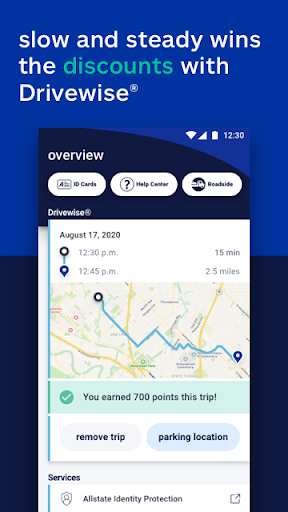
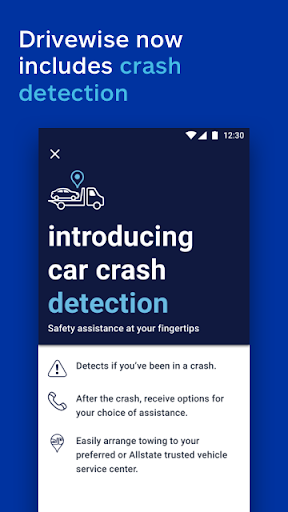
Driving programs add a savings angle too. Drivewise® provides safe-driving rewards and feedback, while crash detection can help you connect with assistance quickly after an accident.
For day-to-day expenses, GasBuddy® integration helps you find gas prices nearby. This feature supports smarter decisions beyond insurance topics.
To round things out, the app includes alerts about extreme weather and a view of your home’s greatest climate risks. It also offers 24/7 roadside help and fraud-focused support through Allstate Identity Protection.
Important notes remain part of the experience, including the disclaimer that electronic proof of insurance may not be accepted by law enforcement or departments of motor vehicles in all states. Drivewise savings can vary, and participation rules differ by location.
People who want a simple insurance companion often praise the Allstate Mobile App for centralizing ID cards and policy management. Many mention they like having everything on their phone instead of hunting through accounts.
Users frequently highlight the convenience of quick access, especially when they need to show an ID card fast. Some reviewers also appreciate the Apple Wallet integration for reduced friction.
When it comes to bills, feedback is usually positive. Reviewers commonly say it is easier to pay and review policy details in one place, which makes monthly management feel less complicated.
On claims and assistance, users often describe the app as reassuring. Crash detection is a standout for those who value fast help during stressful moments.
Some ratings mention that features like Drivewise and savings depend on terms and availability. Reviewers also note the smartphone requirements and the need to activate options properly.
If you are browsing options and considering installation, you may see frequent interest in an Allstate Mobile free download and an Allstate Mobile App Download workflow. Others look for an Allstate Mobile App Download through supported app stores and reputable sources.
Although preferences vary, many reviewers say the overall experience supports staying organized. Some also appreciate identity protection tools and the presence of weather-related alerts.
Overall, the sentiment tends to be that the Allstate Mobile App is helpful, practical, and built for quick access. The best results usually come when you keep your profile updated and review policy details regularly.
Recent updates focus on improving access speed, smoothing navigation, and strengthening support workflows. The goal is to help you get to ID cards, payments, and claims with fewer steps.
Developers also continue refining driving and assistance experiences. Features tied to rewards, feedback, and crash detection can see incremental enhancements and better guidance.
Weather and climate risk tools may receive updates too, since those data sources can change over time. Better alerts and clearer presentation help users stay prepared.
For users planning to install, staying current matters. If you pursue Download Allstate Mobile APK or an Allstate Mobile App Download, be sure you are using an approved and safe source for installation.
Some people search for Allstate Mobile Mobile free download options, but the safest approach is through official store listings. Keeping the app updated helps you benefit from fixes and compatibility improvements.
As part of continuous development, the app may also improve identity-related protections and fraud monitoring experiences. That can make detection and alerts feel more reliable.
To use the Allstate Mobile App, your device must meet the app’s platform requirements and run a compatible operating system version. Compatibility affects how smoothly features like claims and ID access load.
You will need a smartphone with internet connectivity for actions such as bill payments, viewing policies, and managing claims. A stable connection can reduce delays during logins and updates.
Since some features depend on device capabilities, enable relevant system services as needed for crash detection and notifications. These services help the app deliver timely support.
People searching for Allstate Mobile App Download or install Allstate Mobile often ask whether the app works on their phone model. The best way is to verify requirements on your app store listing before downloading.
If you encounter instructions about Download Allstate Mobile APK, treat them carefully. Device compatibility is only one part; install Allstate Mobile safely depends on using a trusted package source.
Once installed, the app can help you stay covered & in control by delivering quick access to digital ID cards, policy tools, and roadside support when needed.
The Allstate Mobile App may request permissions to provide core services, such as notifications for alerts and roadside assistance. These permissions can be important for staying ahead of extreme weather warnings.
For crash detection and help connection, the app may ask for access related to location, motion, or phone functionality, depending on your device and platform. Granting the right permissions can improve response speed.
To support Apple Wallet digital ID features, permissions related to wallet access may be needed on supported devices. This ensures digital cards can be stored and retrieved when you need them.
The app may also require storage access or similar settings to support loading and saving content, such as viewing documents or policy information. This keeps the experience smooth when you switch between screens.
For those pursuing Allstate Mobile Mobile free download or Allstate Mobile free download searches, remember that permissions are granted after installation. Always review prompts carefully before you proceed with install Allstate Mobile.
Because privacy matters, you should understand what each permission does and adjust settings inside your phone controls if needed. Doing so can help you use the app while staying comfortable with your data choices.
Finally, remember that some tools are informational and may not directly affect coverage or rates. Reading the in-app disclaimers helps you understand the limits of each feature.
Whenever you decide to install, you will likely revisit the Allstate Mobile App Download decision. Whether you choose a store download or a guided package option, prioritize security and verify authenticity before downloading.
If you want a consistent experience, keep permissions aligned with your usage goals. That helps features like alerts, driving feedback, and roadside support work as intended across updates.



Welcome to AppSparkle - your independent guide to discovering trending and popular apps. Our mission is to provide a user-friendly platform highlighting popular apps available on official stores.
At AppSparkle, we gather and present app information to help you explore options across Google Play and the Apple Store. Our descriptions are based on public sources and aim for accuracy, but we encourage verifying details directly on official store pages.
Important Notice:
AppSparkle is an independent third-party platform. We are not affiliated with, endorsed by, or officially connected to any app developers, brands, Google Play, Apple App Store, or their parent companies. All app names, logos, and trademarks belong to their respective owners.
We strive to make app discovery straightforward. Links provided will direct you to secure download pages on Google Play or the Apple App Store.


